
09/06/2025
Host Your Own API-Accessible LLM with Ollama
A practical guide to self-host an LLM with Ollama, expose it through an API, secure access, and integrate it with Spring Boot.
Interacting with an LLM (Large Language Model) through an API can be extremely useful in modern web applications. You can use it to extract information, summarize content, generate responses, or build conversational interfaces.
LLM API Market Overview
Today, the easiest option is to use managed APIs from providers such as OpenAI, Anthropic, Google, or Mistral.
These services are powerful and easy to integrate, but they come with trade-offs:
- Cost: API calls can become expensive at scale.
| Model | Description | Input | Output |
|---|---|---|---|
| GPT-4.1 | Most capable model for complex tasks | $2.00 / 1M tokens | $8.00 / 1M tokens |
| GPT-4.1 mini | Good balance between speed and quality | $0.40 / 1M tokens | $1.60 / 1M tokens |
| GPT-4.1 nano | Fast and low-cost model for lightweight tasks | $0.10 / 1M tokens | $0.40 / 1M tokens |
- Third-party dependency: your data goes through external infrastructure.
- Privacy/compliance: some teams need full control over where data is processed.
- Availability/latency: external APIs can introduce outages or variable response times.
- Regulatory constraints: requirements like GDPR can impact architecture decisions.
For these reasons, self-hosting an LLM can be a better fit.
Existing Self-Hosting Options
Several open-source solutions allow you to run LLMs on your own infrastructure:
| Solution | Setup effort | Notes |
|---|---|---|
| Ollama | Very easy | Local API, pre-packaged models |
| Hugging Face + Transformers | Medium to advanced | Huge model ecosystem, more infra work |
| GPT4All | Easy | Quantized models, active community |
| OpenLLM | Medium | Framework to deploy multiple LLM backends |
In this guide, we focus on Ollama.
Why Ollama
Ollama lets you pull and run models like Llama, Mistral, Gemma, and more with simple CLI commands (ollama run, ollama pull). It is developer-friendly, open-source, and exposes a local API by default.
Ollama Native API
A major benefit of Ollama is that an API is available as soon as a model runs locally.
Example request:
curl http://localhost:11434/api/generate -d '{
  "model": "mistral",
  "prompt": "Explain what an LLM is in simple words.",
  "stream": false
}'
You get a local response without external dependency.
Popular models available in Ollama:
| Model | Size | Strengths |
|---|---|---|
| Llama 2 | 7B / 13B / 70B | Strong general model family |
| Mistral | 7B | Fast and efficient |
| Mixtral | 12.9B (MoE) | High quality with optimized resource usage |
| Gemma | 2B / 7B | Lightweight and practical |
| Phi-2 | 2.7B | Small and fast |
| CodeLlama | 7B / 13B | Code generation focused |
| Neural Chat | 7B | Chat-oriented behavior |
| OpenChat | 7B | Conversation fine-tuned model |
Model directory: Ollama Search
Installing Ollama
With Docker
docker run -d --name ollama -p 11434:11434 ollama/ollama
Then pull and run a model:
docker exec -it ollama ollama run mistral
Linux install docs: Ollama Linux docs
If you prefer a PaaS-style deployment workflow, you can use Coolify:
Coolify: The Open-Source & Self-Hostable Alternative to Heroku, Netlify, and Vercel
Calling Ollama from Your App
Default local endpoint:
http://localhost:11434
Example API call:
curl http://localhost:11434/api/generate -d '{
  "model": "mistral",
  "prompt": "Give me a simple definition of artificial intelligence.",
  "stream": false
}'
Example response:
{
  "model": "mistral",
  "created_at": "2023-08-04T19:22:45.499127Z",
  "response": "response here",
  "done": true,
  "context": [1, 2, 3],
  "total_duration": 10706818083,
  "load_duration": 6338219291,
  "prompt_eval_count": 26,
  "prompt_eval_duration": 130079000,
  "eval_count": 259,
  "eval_duration": 4232710000
}
Useful Ollama Endpoints
| Endpoint | Method | Description |
|---|---|---|
/api/generate | POST | Generate text from a prompt |
/api/chat | POST | Multi-turn chat interactions |
/api/pull | POST | Download a model |
/api/push | POST | Push a custom model |
/api/show | POST | Show model metadata |
/api/tags | GET | List local models |
/api/delete | DELETE | Delete a local model |
Reference: Ollama API docs
Spring Boot Integration
If you are using Spring Boot, Spring AI is a clean way to integrate with Ollama:
Securing Ollama in Production
By default, Ollama exposes an unauthenticated API on port 11434. That is fine locally, but risky in production.
Recommended hardening:
1. Restrict network access
- Allow only trusted backend IPs.
- Block public traffic with firewall rules (
ufw,iptables, cloud security groups).
2. Add auth at reverse proxy level
Use tools like Nginx Proxy Manager, Caddy, or Traefik and enforce:
- API key authentication
- HTTP Basic authentication
- JWT validation
If you deploy via Coolify, reverse-proxy controls are available directly.
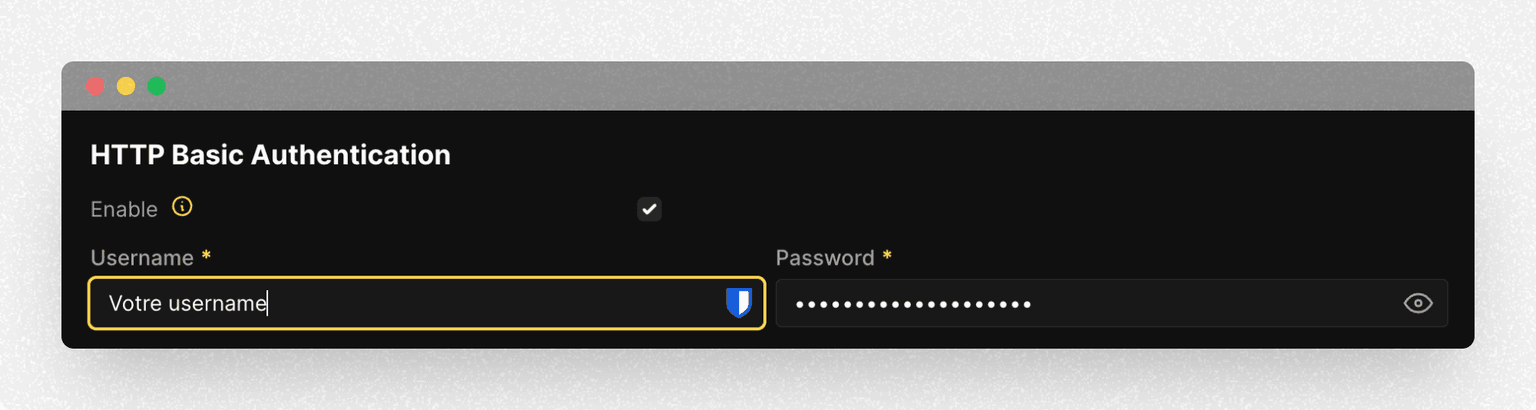
Also enable HTTPS with TLS certificates to protect traffic in transit.
Final Notes
Self-hosting an LLM with Ollama gives you better control over cost, privacy, and operational behavior. For production usage, pair it with strict network filtering, authentication, and monitoring.
Useful links: