
28/04/2025
ClamAV Wrapper: Build an Antivirus Scanning API
Build a Spring Boot API that scans uploaded files with ClamAV (clamd) before storage, with size validation, streaming scan, scheduled signature updates, and Docker deployment guidance.
File uploads are everywhere in modern applications: CVs, profile images, invoices, and internal documents. This convenience also creates a direct attack surface.
If you accept files without scanning them, you expose your platform to malware delivery, ransomware payloads, and downstream infection risks for your users.
Why file scanning matters
Typical controls like extension allowlists and MIME validation are important, but not sufficient.
- Malicious payloads can be hidden in seemingly harmless files.
- Attackers can weaponize uploaded content to target operators and end users.
- A single missed upload check can become a distribution point for malware.
A practical extra layer is server-side antivirus scanning before permanent storage.
Why ClamAV
ClamAV is an open-source antivirus engine maintained by Cisco Talos.
It provides two main ways to scan:
clamscan: command-line binary (easy, but process-per-scan overhead)clamd: long-running daemon with socket/TCP interface (faster and scalable)
For production APIs, clamd is usually the right choice.
High-level architecture
The flow is simple:
- Client uploads a file to your API.
- API validates max size and basic format rules.
- API streams the file to
clamdusing theINSTREAMprotocol. - API parses scan output and returns a structured result.
- Only clean files continue in the business pipeline.
Linux setup (clamd + freshclam)
Install packages:
sudo apt update
sudo apt install -y clamav clamav-daemon
Update signatures:
sudo freshclam
Start and enable daemon:
sudo systemctl enable --now clamav-daemon
sudo systemctl status clamav-daemon
Quick local test:
clamscan test.txt
Spring Boot API contract
Expose an endpoint such as POST /api/v1/scans with multipart/form-data.
@RestController
@RequiredArgsConstructor
@RequestMapping("/api/v1/scans")
public class ScanController {

    private final ClamavService clamavService;

    @PostMapping(consumes = MediaType.MULTIPART_FORM_DATA_VALUE)
    public ResponseEntity<ScanResultDto> scan(@RequestPart("file") MultipartFile file) {
        return ResponseEntity.ok(clamavService.scan(file));
    }
}
Response DTO
Return enough metadata for observability and decisions:
@Data
@Builder
public class ScanResultDto {
    private String fileName;
    private String extension;
    private long size;
    private long durationMs;
    private boolean infected;
    private String virusName;
    private String rawResponse;
}
Service configuration
clamd.host=127.0.0.1
clamd.port=3310
clamd.maxfilesize=10MB
spring.servlet.multipart.max-file-size=10MB
spring.servlet.multipart.max-request-size=10MB
Streaming scan implementation (INSTREAM)
@Service
@RequiredArgsConstructor
public class ClamavService {

    @Value("${clamd.host}")
    private String host;

    @Value("${clamd.port}")
    private int port;

    @Value("${clamd.maxfilesize}")
    private String maxFileSize;

    public ScanResultDto scan(MultipartFile file) {
        long start = System.currentTimeMillis();
        validateFileSize(file.getSize(), parseSizeToBytes(maxFileSize));

        try (
            Socket socket = new Socket(host, port);
            DataOutputStream out = new DataOutputStream(socket.getOutputStream());
            BufferedInputStream in = new BufferedInputStream(socket.getInputStream());
            InputStream fileInput = file.getInputStream()
        ) {
            // Tell clamd to expect a streamed file
            out.write("zINSTREAM\0".getBytes(StandardCharsets.US_ASCII));

            byte[] buffer = new byte[8192];
            int read;
            while ((read = fileInput.read(buffer)) != -1) {
                out.writeInt(read);
                out.write(buffer, 0, read);
            }

            // End of stream marker
            out.writeInt(0);
            out.flush();

            String response = new String(in.readAllBytes(), StandardCharsets.US_ASCII).trim();
            boolean infected = response.contains("FOUND");
            String virus = infected ? extractVirusName(response) : null;

            return ScanResultDto.builder()
                .fileName(file.getOriginalFilename())
                .extension(extractExtension(file.getOriginalFilename()))
                .size(file.getSize())
                .durationMs(System.currentTimeMillis() - start)
                .infected(infected)
                .virusName(virus)
                .rawResponse(response)
                .build();
        } catch (IOException e) {
            throw new RuntimeException("ClamAV scan failed", e);
        }
    }

    private void validateFileSize(long actual, long max) {
        if (actual > max) {
            throw new IllegalArgumentException("File exceeds allowed size");
        }
    }

    private long parseSizeToBytes(String value) {
        String v = value.trim().toUpperCase();
        if (v.endsWith("MB")) return Long.parseLong(v.replace("MB", "")) * 1024 * 1024;
        if (v.endsWith("KB")) return Long.parseLong(v.replace("KB", "")) * 1024;
        if (v.endsWith("GB")) return Long.parseLong(v.replace("GB", "")) * 1024 * 1024 * 1024;
        return Long.parseLong(v);
    }

    private String extractVirusName(String response) {
        // Example: stream: Eicar-Test-Signature FOUND
        int idx = response.indexOf(":");
        int end = response.indexOf("FOUND");
        if (idx == -1 || end == -1 || end <= idx) return "Unknown";
        return response.substring(idx + 1, end).trim();
    }

    private String extractExtension(String fileName) {
        if (fileName == null || !fileName.contains(".")) return "";
        return fileName.substring(fileName.lastIndexOf('.') + 1).toLowerCase();
    }
}
Keep signatures updated with Spring scheduling
Use a scheduled job to run freshclam daily.
@Component
@Slf4j
public class ClamavUpdateScheduler {

    @Scheduled(cron = "0 0 0 * * *")
    public void updateVirusDefinitions() {
        try {
            Process process = new ProcessBuilder("freshclam")
                .redirectErrorStream(true)
                .start();

            try (BufferedReader reader = new BufferedReader(
                new InputStreamReader(process.getInputStream(), StandardCharsets.UTF_8))) {
                String line;
                while ((line = reader.readLine()) != null) {
                    log.info("[freshclam] {}", line);
                }
            }

            int exit = process.waitFor();
            if (exit == 0) {
                log.info("ClamAV definitions updated successfully");
            } else {
                log.error("freshclam failed with exit code {}", exit);
            }
        } catch (Exception e) {
            log.error("Failed to update ClamAV definitions", e);
        }
    }
}
Make sure scheduling is enabled with
@EnableScheduling.
Test with EICAR
Use the standard EICAR test string/file to validate detection safely:
Docker deployment example
FROM eclipse-temurin:21-jre

RUN apt-get update && apt-get install -y --no-install-recommends \
    clamav clamav-daemon ca-certificates && \
    rm -rf /var/lib/apt/lists/*

RUN freshclam || true

COPY target/app.jar /app/app.jar

EXPOSE 8080 3310

CMD clamd --config-file=/etc/clamav/clamd.conf & java -jar /app/app.jar
Optional: VirusTotal vs self-hosted ClamAV
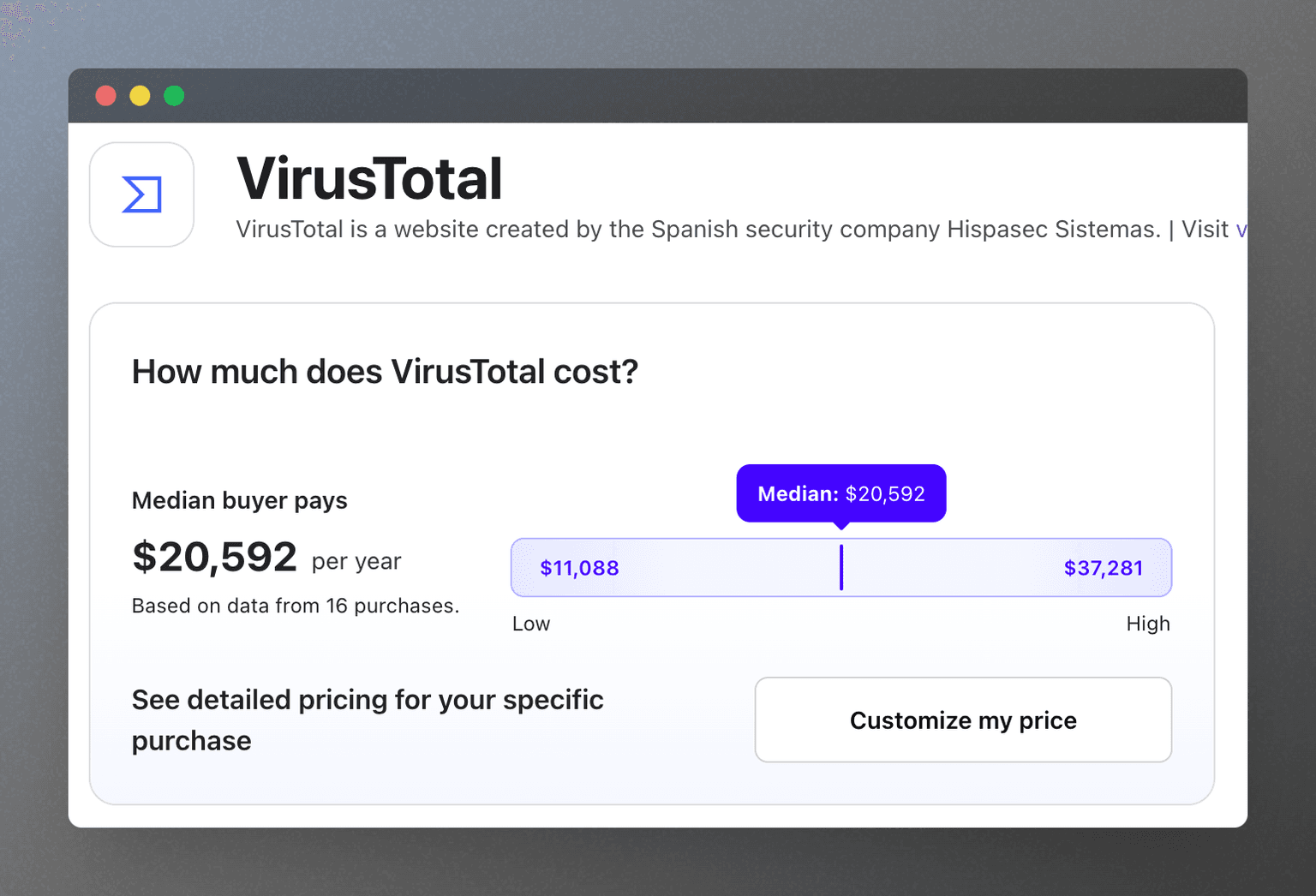
Managed malware scanning services are powerful but can become expensive depending on your volume and requirements. For many internal or moderate-scale workloads, ClamAV can be a strong baseline when paired with strict input validation and operational monitoring.
Security checklist
- Enforce strict upload size limits.
- Allow only required file types.
- Verify MIME type and file signatures.
- Scan every uploaded file before storage.
- Quarantine or reject infected files.
- Log scan outcomes for auditing.
- Automate signature updates.
Conclusion
A ClamAV wrapper API is a practical, production-friendly way to harden file uploads in Spring Boot systems. With streaming scans, scheduled signature updates, and clear API responses, you can significantly reduce malware risk without introducing heavy platform complexity.