
26/12/2024
Uptime Kuma: The open-source monitoring solution you need
In today's digital age, uptime monitoring has become essential for businesses and developers to ensure their websites, services, and applications remain available and reliable. Among the various tools available, **Uptime
In today's digital age, uptime monitoring has become essential for businesses and developers to ensure their websites, services, and applications remain available and reliable. Among the various tools available, Uptime Kuma stands out as a robust, open-source alternative for monitoring uptime and performance. In this article, we will explore what makes Uptime Kuma a compelling choice, its key features, and how you can set it up for your projects.
What is Uptime Kuma?
Uptime Kuma is an open-source self-hosted uptime monitoring tool designed to help users keep track of their services and websites. Created by Louis Lam, it offers a user-friendly interface, extensive customization options, and powerful monitoring capabilities. Inspired by commercial services like UptimeRobot, Uptime Kuma provides a free alternative without compromising functionality.
Unlike many paid solutions, Uptime Kuma allows you to host the tool on your own infrastructure, giving you full control over your data and monitoring setup. This self-hosted approach ensures privacy, scalability, and the ability to tailor the system to your needs.
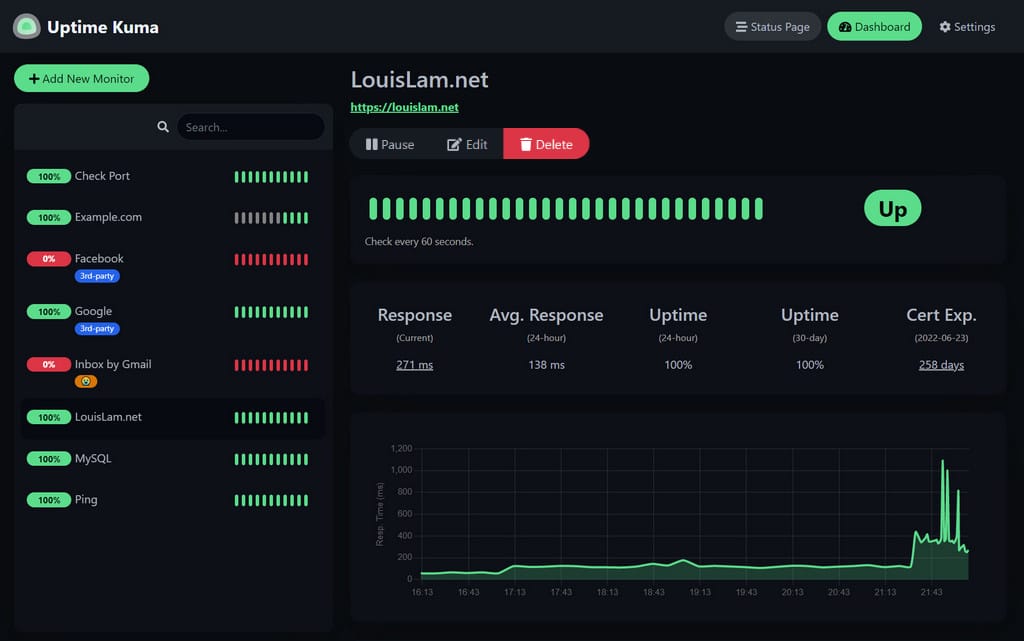
Key features of Uptime Kuma
Uptime Kuma offers a wealth of features that make it a versatile tool for both individuals and businesses:
Easy-to-use interface
The clean and intuitive web-based interface of Uptime Kuma simplifies the process of setting up and managing monitors. The dashboard provides an at-a-glance view of all monitored services, their statuses, and historical uptime data.
Wide range of monitoring types
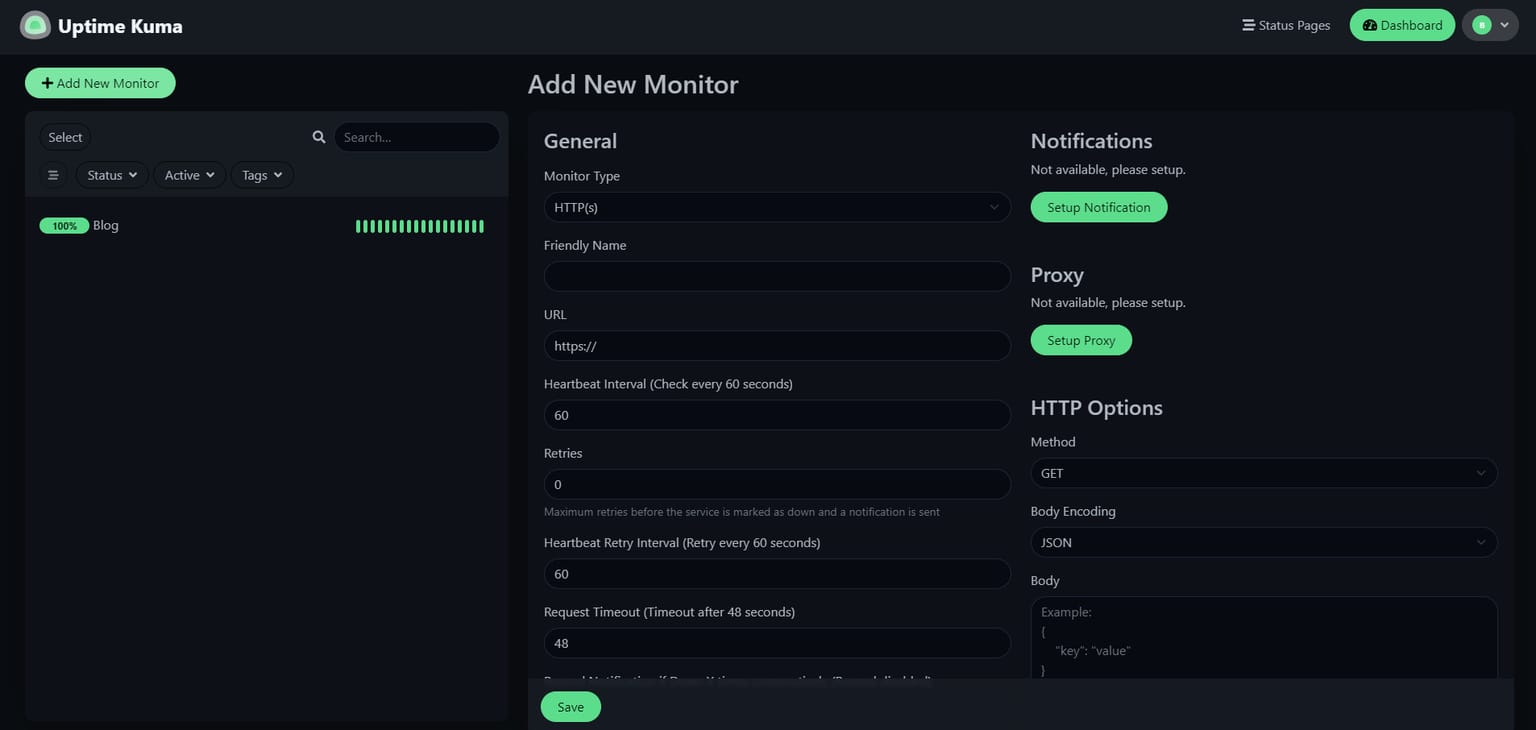
Uptime Kuma supports multiple types of monitoring, including:
- HTTP(S): Check the availability and response time of websites.
- TCP Ports: Monitor specific ports on your server.
- Ping: Measure latency and connectivity.
- DNS Queries: Ensure DNS records are resolving correctly.
- Push Notifications: Use webhooks or custom scripts to send status updates.
Customizable alerts
Stay informed with customizable alert options. Uptime Kuma integrates with popular notification platforms, including:
- Slack
- Telegram
- Discord
- Microsoft Teams
- Webhooks
These notifications ensure you’re alerted instantly in case of outages or performance degradation.
Multi-Language support
With support for numerous languages, Uptime Kuma is accessible to a global user base.
Historical logs and statistics
The tool maintains detailed logs and uptime statistics for each monitor. This data helps you analyze trends and identify potential issues over time.
Self-hosting flexibility
By hosting Uptime Kuma yourself, you’re not reliant on third-party servers. This ensures better data privacy and allows for customization to fit your unique requirements.
You can easily host Uptime Kuma on Coolify.
Coolify: The Open-Source & Self-Hostable Alternative to Heroku, Netlify, and Vercel
Resource efficiency
Uptime Kuma is lightweight and efficient, capable of running on minimal hardware. This makes it ideal for small businesses and personal projects.
Installing Uptime Kuma
Getting started with Uptime Kuma is straightforward, thanks to its well-documented installation process. Below, we outline the steps to set up Uptime Kuma on a Linux server using Docker:
Prerequisites
- A Linux server with Docker installed
- Basic knowledge of command-line operations
Install with Docker image
docker run -d --restart=always -p 3001:3001 -v uptime-kuma:/app/data --name uptime-kuma louislam/uptime-kuma:1
Access the web interface:
Open a browser and navigate to http://<your-server-ip>:3001. You’ll be greeted with the Uptime Kuma setup screen.
Create your first monitor: Follow the on-screen instructions to add monitors for your websites or services.
Optional customization
Uptime Kuma supports advanced configurations such as reverse proxy setups with NGINX or Apache, allowing you to secure the interface with SSL/TLS certificates.
Use cases for Uptime Kuma
Uptime Kuma can be used in a variety of scenarios:
- Website Monitoring: Ensure your websites are always accessible and performing optimally.
- Service Health Checks: Monitor APIs, databases, or other backend services.
- Network Monitoring: Track connectivity and performance of network devices.
- Team Alerts: Notify your team immediately when downtime occurs.
Why choose Uptime Kuma?
Open-Source and free
Unlike many commercial uptime monitoring services, Uptime Kuma is completely free to use. Its open-source nature means you can inspect the code, contribute to the project, or adapt it to your needs.
GitHub - louislam/uptime-kuma: A fancy self-hosted monitoring tool
Community-driven development
The active community around Uptime Kuma ensures regular updates, new features, and responsive support. Users can report issues or request features via the project's GitHub repository.
Contributors to louislam/uptime-kuma
Privacy and control
Self-hosting means you retain full control over your data. There’s no reliance on third-party services, making it a great choice for businesses with strict compliance requirements.
Uptime Kuma is a powerful, flexible, and cost-effective solution for uptime monitoring. Its ease of use, extensive features, and self-hosting capabilities make it a worthy choice for developers, small businesses, and enterprises alike. Whether you’re managing a personal blog or a complex network of services, Uptime Kuma ensures you stay informed and proactive about your system’s health.
Start monitoring today by installing Uptime Kuma and take the first step toward better uptime management.